If you already have a reasonable working knowledge of it, you’ll probably learn little in you choose to read on, as so far, my experience is very minimal. However, if you know bugga all and have some interest, I may inadvertently provide an insight that could send you off on a research frenzy and a subsequent bank balance destroying journey.
Where the hell do I start?
I believe the Origin was released in the States in 2017 and as I remember it, it wasn’t far after that when I became aware and wanted one.
Having a 110V converter, I penned a request from the manufacturer to purchase an Origin. They kindly refused, stating that without local Australian support, any issues I had would only besmirch their brand.
Then there was that phantom lady DevinT that spruiked her experience with the Origin that had me green with envy,
Back then I could think of a 1,001 uses for the gizmo. Fast forward to 2025… after a pinched nerve in my back that rendered my left arm near useless for a few years, COVID 19, and our govermin taxing us Victorians into near poverty, one of our woodworking distributors imported the Origin into Australia.
Remembering my past desires, the order was placed without hesitation, not thinking what I could use it for nowadays. It arrived in Jan 2025 in its systainer,
I wont even try to list what was in the “kit” as being an introductory offer I bought a swag of extras. I got a 3.2mm collete to accept my existing Dremel and Foredom bits and an 8mm collete to accept my Leigh bits,
At the moment I cannot suggest what are good router bit starters as I’ve only used the 6.35mm, however, in my typical fashion, I bought quite a few extras that I thought might be handy, but may never use. Perchance some Origin users out there may make some recommendations about their favourite/most used bits.
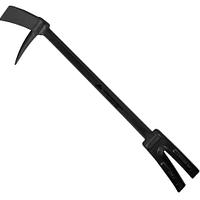
Waiting for delivery, I watched a few videos and found the presenters use of this lever
invaluable, so I slipped it into my order. I can also imagine this thin spatula supplied with one of my “dead” 3D printers,
could be invaluable, but will reserve further comment as I haven’t double sided tape, with the Origin, yet.
After watching a few videos, reading ½ a page of the manual… OK, I looked at the pictures and did a dry run without powering the router on… it went into hibernation for about 9 months.
Then someone (R'Gi I think) mentioned something like he bent over an Origin for about 30 minutes on a particular project which scared the bjesus out of me with my dodgy arm… I couldn’t imagine trying to control the Origin as a cripple.
Then I did some UGH reading about the BenchPilot, which apparently automated the Origin into a functional CNC without idiot operators.
On hands and knees committed SWMBO a year’s supply of new shoes, and cajoled permission to place an order for the BenchPilot.
It took nearly 6 months to arrive in Aussieland after placing the order (and paying for it), suddenly I now have just a tad too many shekels invested to let the Origin lie fallow.
I’ll try to give some basic insight into the Origin here, and plan to follow up with further reviews on the BenchPilot and other associated accoutrements unless I receive a petition by 6,454 Craftisian signatures not to.
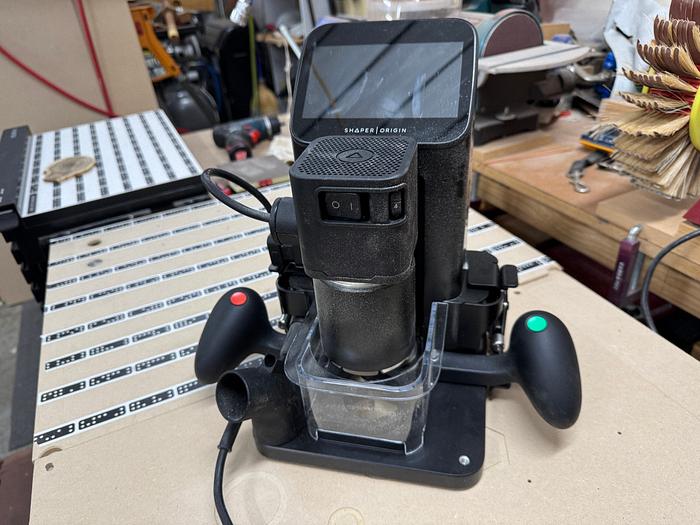
The Origin depends on a series of “dominos” from a roll of Shaper Tape,
laid out in parallel rows spaced 50 to 75mm apart, keeping individual strips under 914.4mm long. This is then scanned using the camera on the back of the router,
and stored in memory (and I believe uploaded to “My Files” on the Shaper HUB). Ensure the Origin’s camera can see at least three non-overlapping strips of tape at all times by checking the domino indicator on the tool
when it turns red
it’s lost and it has to be moved to register/detect more dominos.
Using the memory image and where the Origin is placed, it knows exactly where it is relative to the domino pattern.
Now I was ready to make the first test cut. I have set up a 6mm sheet of 445mm x 603mm MDF laid out with the tape,
(why 603mm?... cause I thought 602mm was just a tad too short). This set up the table to let me practice in another blank sheet of 6mm MDF.
Now the footprint of the Origin’s router is much larger than a CNC’s typical trimmer, you can’t afford to have protrusive clamps so I held the taped sheet down using my TSO loc-dogs,
Both the tape and the top of your job has to be level and is normally held in place by double sided tape, however, as this was just a small test, there was enough friction to prevent my test sheet from sliding around.
The boffins at Shaper have done their homework, or just found another way to rip me off, and recommend this tried and tested double sided tape that they sell,
(don't use your carpet tape!!!).
For this review, I fired up the Shaper which connected to the Internet, confirmed the latest software upgrade (NAPA),
and accessed “My Files” on the Shaper HUB where I have already saved the map of this setup.
Normally you would “grid” your job and if you have a long router bit
you lower it enough to let the flat engage the work or the router but is flipped so the smooth end of the shaft is protruding for the touch… flutes jeopardise the integrity of the touch.
This flat part is gently pushed into the work in 3 places, without denting the work or deflecting thin router bits,
where contacts 1 and 2 establish one axis (can be either X or Y depending on the first side touched) and 3 establishes the other 90° axis.
I opted against gridding for this demo run.
I went into the design option on the screen ("CREATE"), and selected a 6-sided polygon, set to 60mm in size,
and hit the green “place” button, creating the shape centered directly below the router bit… without a proper grid, this was not an exact placement, but once placed it is then anchored.
Selecting the “Cut” option (1) from the screen from the following display,
Having specified a 1mm depth of cut (2), “inside” cut (3), with a zero offset (4), using a 6.35mm router bit (5) you are nearly ready to cut.
First you need to do a Z-Touch(6), which lowers the router bit till it touches your job to set the bits height, turn the motor on and press the green “Cut” button (7) on the right handle.
In the picture you can see the turquoise outline of the subject’s perimeter. The dotted line represents the cut line calculated from the bits diameter and the “inside” cut line (no offset). That dotted line pulsated in the direction the router calculates as the appropriate cut direction.
Now this is where the magic happens. As long as you keep that “target +”(8) inside the 12.7mm dia. white circle, software guides the router bit to follow the white dotted line and keeps self-centring on it creating a continuous perfect “line”. If you deviate outside the circle, the bit is immediately retracted and you have to manually reposition it and press the “Cut” button again.
As the cut progresses, the path is filled in by a blue shade,
so, you have an indication of where you started and when the blues meet, the cut is complete.
The resultant cut was a bit furry,
but a gentle rub with sandpaper and a brush
The outer perimeter’s corners are a tad rounded due to the diameter of the router bit, however, the inside perimeter is perfect.
Note that old placed cuts are remembered if you hover over them,
unless they are erased.
DT, R’Gi or any Origin user, please correct me wherever you find I’m speaking through my rrrs!
Don’t be crafty Craftisians,... SHARE your craft!
If your first cut is too short... Take the second cut from the longer end... LBD
sorry ducks looks like one fantastic review but already knowing ill never buy one or need one so i didn't bother to read you fantastic review my friend ! first off, id never figure out how to even use this thing. second even if i did i have no use for it !
working with my hands is a joy,it gives me a sense of fulfillment,somthing so many seek and so few find.-SAM MALOOF.
Thanks Birdie... Went to bed one night and woke up with a slipped disc in my back which pinched a nerve that ran down to my left little finger. However it virtually rendered the arm useless for pushing sideways and forwards. Lost about 90% use, though I could still lift with what little use I had left. Doctors said to operate they'd have to open my chest push everything aside to get to the damage or come in blind from the back where a slip could paralyse me. I opted to leave it. It's been nearly 6 years and I've got about 85% use back though it's still weak in certain directions/ maneuvers . SWMBO was happy as I couldn't pick my left nostril anymore, as the right hand did too much bloody (literally) damage..
If your first cut is too short... Take the second cut from the longer end... LBD
Thanks Pottzy, however, I can appreciate you/people writing this off due to cost and maybe, just maybe a (not that steep) learning curve. Unless you are into only hand tools, like an engraver vs branding iron, most workshops could use a CNC/laser_cutter. I've been struggling to find worthy use for this, but that's because everything I need can be done with my laser cutter and for thickness I laminate from 3mm and 6mm MDF as that's not because I sleep with it but that's whats readily available... even ply is only the lowest grade. However, if I had access to all the exotics you Yankees see lying on the side of the road and scrap bins, I'd appreciate the use of a CNC that can cut 19mm easily and this gizmo can do that... no charring and only downside is a greater kerf... a thick wood laser cutter is even out of NASA's scope.
If your first cut is too short... Take the second cut from the longer end... LBD
I love my Shaper Origin. Not an everyday tool, but when it’s the right tool..it’s really the right tool! Not better than a proper CNC table, but hen I don’t have room for one of those. Nice write up, ducky.
Ryan/// ~sigh~ I blew up another bowl. Moke told me "I made the inside bigger than the outside".
Thanks R'Gi... I'm hoping that the BenchPilot will simulate a CNC... I have increased the size of the Workstation shelf though it's still limited by the workstation size limiting the BP's scope. Nevertheless with careful gridding and shifting left/right I hope to be able to extend the work area... if I can find a worthy project. I've found that using Shaper Studio the plunge depth can be auto set.
If your first cut is too short... Take the second cut from the longer end... LBD
Good to see you breaking out the new(ish) hardware! Don't hold back on comments (good or bad) as being the complex new-kid on the block, user experience really matters for these tools.
Good job duckie...there is a lot here to digest....so give me a minute or 200....O have an interest in this item... I spent to today the whole day trying to get my wifi updated by a guru, however i repeatedly heard "now why the hell is it doing this....or wtf is that now? " I want to pour over this and absorb it...so I will have questions coming, but now I am a whole day behind....
Mokey, I'm far from an expert, however, while no bloody RTFMing, I've watched a lot of videos and can help with all the beginners questions... for advanced features... RTFM or watch some of these videos (in reverse order).
My only regret is that I already have tools this makes redundant like my Domino, Leigh D4R, Leigh MFT...
My Woodpeckers Corner Jig, about 20 holesaws, all my forstner bits can also be replaced with the aid of the Shaper Plate which is next on my review list.
If your first cut is too short... Take the second cut from the longer end... LBD
Not really Pottzy, they're extras you can do that people might not think of... not only that, you could sell the redundants... a Domino in good condition would nearly pay for half an Origin.
If your first cut is too short... Take the second cut from the longer end... LBD
Just IMO, but the Origin doesn’t replace the Domino. It certainly can do the same work, but it would be much slower and more cumbersome to use in that setting. The Domino is a one trick pony in the absolute best sense of the word. Now, if you wanted a single tool that could do all these things, then I do believe the Origin would fit the bill…but it wouldn’t be nearly as convenient as having some of the other ‘analog’ unitasker tools… Origin is a modern tool marvel, but not a panacea.
Ryan/// ~sigh~ I blew up another bowl. Moke told me "I made the inside bigger than the outside".
We were born the wrong gender ! In its heyday Penthouse, (which outsold playboy for a while) paid attractive young girls USD10K for a photo shoot and USD100K for a centerfold, (not bad loot for flashing the snapper!) Sadly like most publications the internet overtook the business
Coincidentally if you look into the dealings there is Donny again and a replica of late regarding Jeffery
I wonder if anybody knows Bob Guccione's body count was? Penthouse ran from 1965 to 2022 so that's about 56 odd years and the same number of centerfolds, so using the analogy of you never have just one beer, you can reasonably estimate an impressive average.


.png)