You may ask “What is Shaper Trace?”… or I’ll ask for you, “What is Shaper Trace?”
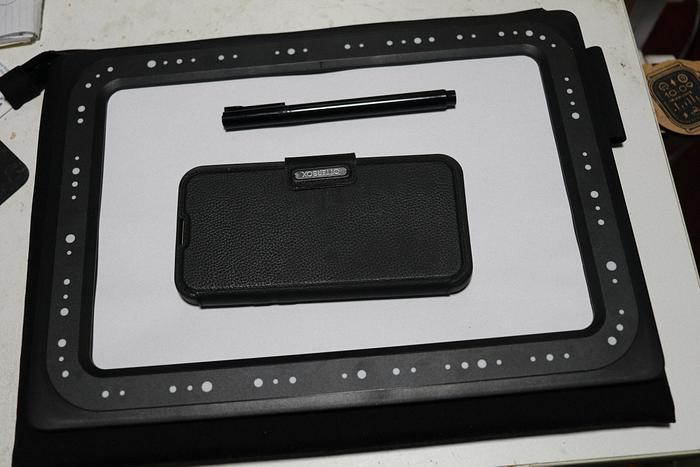
Shaper Trace is a drawing toolkit that allows you to turn any sketch or drawing into a vector graphic by simply taking a picture using an app launched by a mobile (cell to Yankees) phone . Place the Trace Frame over your sketch and convert it into a SVG (Scalable Vector Graphic) with the Trace App, ready for fabrication using the tool of your choice, from laser cutters and vinyl cutters to CNC machines like Shaper Origin and more.
With all my designs for laser cutting/engraving, this would have saved me a fortune in time, and at my age my time is worth my weight in gold, and with my weight, I need a Fort Knox in my backyard if I charged for time.
To use/execute, you need the frame, a black ink pen or dark leaded pencil, A4 sheet of paper and a smart phone. The "kit" only includes the frame, however you can also buy a case to house the frame, some A4 blank paper and the pen.
I haven’t made a video (yet) and you shouldn’t get sucked in by the promotional hypes, as from my very short experience, a lot depends on your tracing ability… mine sucks big time,
but that lack of my talent led to only a 4* review.
Nevertheless, if the boffins at Shaper take this product as seriously as their Origin software, improvements and new features will be a regular event.
The software is free, but it depends on this frame
with a dotted border (referred to as fiducial dots), that works much the same as the dominos for the Origin, but that's another review for the future.
Its outside measurements are 338mm X 248mm with a usable capture area inside the Frame measuring 263mm X 173mm. This flipside with an A4 page
gives an indication of capture size… which had me concerned about limited subject size. Quickly followed it up with a Google AI inquisition:-
Q. Can you capture in parts with Shaper Trace and stitch them together?
A. Yes, you can capture a large design in parts with Shaper Trace and stitch them together, but the Shaper Trace app does not do this automatically. Because the Trace frame sets a 1:1 scale based on the unique fiducial dots around its border, you cannot simply snap overlapping photos and expect the app to stitch.
So I have to stitch withing my chosen SVG processing app (CorelDraw... or freebie Inkscape amongst others)... with a 1:1 top down 2D drawing, stitching is not an issue.
The frame gives the software a perspective where it can extrapolate positioning and scale, returning an accurate picture with a decimal mm measurement accuracy (my words).
You can frame the photo in most angled positions and a trace being 2D, it creates as perfect an SVG as you can sketch.
However, for the actual object (without tracing), I found that its 3D shape created shadows that seemed to confuse the SVG and created more vectors that I was prepared to tidy up at the moment (more on this below).
I have been informed that I would get much better results if I placed the framed object on the floor and with appropriate lighting, try to get as close to a vertical top down framing with the phone… a near impossible task with my gut, but worth further investigation some dieting time later.
To use/launch the app, you need to scan the QR code on the back of the frame,
I don’t profess to know how these smart phones work (I’m an ex mainframe guy), but it works. This will register your product on the ShaperTools website. Once registered, you can use the app, and the easiest way to process any created SVG is to store it online by clicking on “Save to Shaper My Files”, which can then be accesses on the ShaperTools website under your userid (created when registering the frame),
For my initial test, generated a Sketchup model for the box for my new HOZO NeoSander, much like my HOZO NeoBlade box.
My first “trace” created a very ordinary SVG,
My second attempt was a tad better,
however, I cheated and ChatGPT’d it
to create a symmetrical outline resulting in,
The sanding pad racks “trace” created better results,
which was further tidied up in CorelDraw.
Both were them imported into SketchUp as DWG files and then the box created.
I did a snapshot of both items (without tracing),
which generated the following SVGs on the Shaper WEB site,
and downloaded to my PC and opened up in CorelDraw,
Not that neat, but 1:1 scale, however, AI could tidy them up. With the app being free, I’ll wait till the Shaper boffins incorporate some AI into their app.
Will it pay for itself? For me yes… for you, you’ll just have to be imaginative to think of where you might use it and if you laser, CNC, 3D print, scroll, cut vinyl to name all that I could think of, it’ll save a lot of headaches even if you work for slave labour rates.
Don’t be crafty Craftisians,... SHARE your craft!
If your first cut is too short... Take the second cut from the longer end... LBD
Nice write up, ducky. I’ve had the Trace since it was released and have found some use for it. I agree, it very much comes down to how clean your initial drawing is…although your use of AI to clean up the image is inspired. Well done! Using a fine tip pen, I was able to get good results using Trace. I’d say it’s best use case is for free form, artistic renditions…drawings that would be much more difficult to properly create in a drafting program. Where I think Trace really shines is the 1:1 scaling. If you can lay out the drawing accurately, even by hand, Trace gives you a highly accurate scan that scales very well in practice. That means that the smaller size of the frame isn’t such a big deal…just scale your drawing down, then scale the file back up after it’s scanned. I’ve found good results with that. That said, I don’t know how large the margin of error gets with major scaling. I don’t know if you could scale cutting paths for inlay pieces well enough for a tight fit beyond a certain range.
It’s not a do-all product, but it is a great addition to the Shaper Origin, IMO…especially if you want to convert free-form drawings to a cutting file.
Ryan/// ~sigh~ I blew up another bowl. Moke told me "I made the inside bigger than the outside".
Thanks for that feedback R'Gi... I am hoping that with the Shaper Origin concept of continual software improvement, they will follow the same path for this software and If they integrate it with AI, I'll be blowing smoke rigs from other than my mouth. Using these type of 'gizmos' is only limited by the users imagination... I can see a lot of potential with the 1:1 scaling and the SVG is as perfect as my wobbly trace.
If your first cut is too short... Take the second cut from the longer end... LBD
I like the concept since I find myself doing a lot of conversions from object/photo to SVG.
Usually for objects I'll place it, along with a scaling object, on the screen of an old LCD monitor lying flat with a white background video. Overhead camera shot gives a great outline which then can be traced for the bordering path. Backlighting is the key here.
For photos, been having excellent results with GeminiAI for the tracing.
I used to photograph/scan and import the PNG into SketchUp, trace over it manually and then resize... The Trace lets me save the SVG using Corel to a DWG file imported into SketchUp, all 1:1 scale... sound wordy but a helluva more streamlined than my past efforts.
If your first cut is too short... Take the second cut from the longer end... LBD
Yeah, really what that frame and the simple software are doing is just knocking down several steps at once. It’s not revolutionary, but it is a nice leap forward for this sort of thing…but you stiff have to have a clean drawing, and you only get what you give it…so, as ducky pointed out, it would be nice to have some AI behind it to smooth, straighten and square it all up.
Ryan/// ~sigh~ I blew up another bowl. Moke told me "I made the inside bigger than the outside".



%20-%20Untitled-1-010929.png)


%20-%20--NAS453BT3-Manuals-Alex-All-Myfiles--Sketchup%20Jobs-SketchupModels-Worksho-010941.png)


%20-%20P--Photos-Small%204%20onforward--4%20Craftsian-@%202B%20Reviewed-56%20-%20Shaper%20Trace-N-011110.png)




.png)

