Share your craft projects
Make new craft buddies
Ask craft questions
Blog your craft journey
LIttleBlackDuck
5781 posts
and
54 followers
in almost 4 years
in almost 4 years
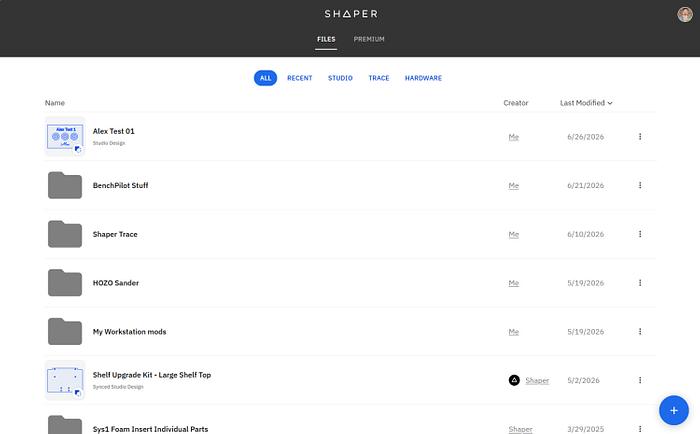
Shaper Studio
Disclaimer,
- My justification of the 4* review is based on its benefit combined with the use of the BenchPilot. The -1* reduction is due to me disliking WEB based software that is uncontrollably influenced by Internet availability, bandwidth and traffic.
- The main purpose of the review is to raise awareness of the product(s) and not necessarily to educate.
Boys and Girls,
I’m planning/have started a series of reviews about the Shaper Origin and associated accoutrements:-
1. Shaper Origin.
2. Shaper Plate.
6. Shaper Studio (this review).
7. Shaper Trace.
Shaper Studio is available for limited, free use or can be licensed for unlimited use.
Rather than regurgitate the info available on the Shaper WEB site, the following is their answers to the more common questions about the Shaper Studio (ST):-
Rather than regurgitate the info available on the Shaper WEB site, the following is their answers to the more common questions about the Shaper Studio (ST):-
- All you need is a Shaper Account, which you can create for free here.
- Studio is designed to be easy to use for all sorts of digital fabrication tools. You can use the .SVG output with vinyl cutters, laser cutters, desktop CNC machines, and more.
- Studio is designed for use with both laptops and touch devices like phones and tablets.
- If you have a License, you can sync your designs directly to Origin (with real-time updating!) or you can export your design as an .SVG for use with other digital fabrication tools. If you don’t have a License, you can still export up to three designs from Studio per month. This includes exporting to your computer, tablet, or phone, as well as exporting for use with Origin.
- If you are a licensed user of Studio, your Studio designs are synced in real time with any Shaper Origin you are also logged into. If you are not a licensed user of Studio, you are still able to transfer your Studio designs to Origin, but you will need to actively export your design to Origin and you are limited to three exports from Studio per month (either to Origin or elsewhere).
This review is based on my requirement for the Shaper Origin, and more specifically with the BenchPilot (BP), however, take note of the ad spruik stating:-
- You can use the .SVG output with vinyl cutters, laser cutters, desktop CNC machines, and more.
While my primary design flow starts in SketchUp → Layout (part of licensed SketchUp) → PDF → CorelDraw → Laser software, I could create the SVG files required by Origin out of CorelDraw (CD).
Apparently there is a workaround in CD to imbed bit depth and other control parameters, the process as reported by AI reads like a PITA, and I hate reading.
I prefer to design/customise my projects on the PC, so if I intend to make use of my Origin, I will be creating more than the permitted 3 free designs without the license.
Not being an advocate of subscriptions, I forked out for a full license… if I live long enough to take advantage of it, great, and if I don’t, I doubt I’ll give a toss.
The site navigation is just as painful as any other WEB sites I’ve encountered… but that may be due to my avoidance of WEB based software.
Having stumbled around, I found that everything I did/designed on my Origin was recorded/migrated/uploaded to Studio online.
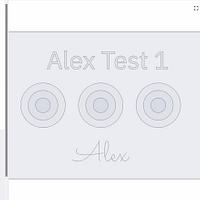
This is the design I drew up/sized in CD, as a pilot exercise for using on my BP,
%20-%20S--Projects-Shaper%20Origin-BenchPilot-Test%2001-Corel-Test%2001.cdr-011200.png)
and exported/uploaded the SVG into Studio,

After “placing” the import, you are presented with the design screen (1),

with the available options (2)…. I selected text (3) and entered the name of the image “Alex Test 1” using a randomly choosen font (2),

as it was only for doco purposes and will not be processed. I also selected a Single Line Font (SLF) (2) and entered the text “Alex” (3) to be engraved using a "V" bit,

followed up by selecting PLAN (4) which brought up the following screen,

Upon entry, all items are automatically selected displaying “mixed” cut type (1), “mixed” depth (2) and the number of individual cuts (3)… which includes the lines associated with the non-cut text “Alex Test 1” (9 cuts, though would not be executed).
Take special notice of the text I intend to “engrave” (4) (more on that later).
Also worth noting that the “Offset” (5) is set to 0.0 (more on this later as well).
Selecting the perimeter box will display its characteristics...

line the line itself (1), the cut type "outside" (2), that may default or may need to be changed, and the depth of cut (3) that has to be set.
Using the cursor I selected the text “Alex Test 1” (1)

(which also selected the perimeter, that had to be deselected (shift + cursor). It’s reported as comprising of 9 “cuts” (2). The cut type (3) is set to “guide” indicating it is for guidance and not to be processed/cut… naturally the depth is not set.
Going onto the circles,

each circle (cursor selected) (1) will need both the cut type (2) and depth (3) manually set as desired. Each circle will display its own characteristics,

Finally, you can review what the end result may look like,

as long as you don’t zig when you should’ve zagged. The bottom line is that you can specify your cutting characteristics in the Studio software and only need to confirm/check on the Origin if you aren’t confident, but no longer need to design on the tool itself.
Time to tackle that “Alex” (1) text designed to be engraved, that I screwed up during my BP pilot run,

Which consisted of 10 separate cuts (2). The cut type (3) was set to “on line” as it was planned to use a “V” bit. Unfortunately I had a wrong depth (4) of 2mm and bit diameter (5) 3.15 set which was eventually passed to the BP and screwed up its engraving… though that was due to my ignorance/arrogance both in Studio and on the Origins “Preview cuts” part of the BP interface.
What I should have done in Studio was,

Reduce the depth to 1mm (4) but more so the bit diameter (5) to 1mm. Actually, this wouldn’t make any difference during the cut other than visual prompting, but the text should have been deselected, have the deselection confirmed (step I forgot), and recut AFTER the “V” bit was interchanged.
Offset is a feature of Origin that permits cutting a fraction inside/outside the actual perimeter by a small offset and take the finishing cut on the actual line with a 0.0 offset that will smooth out any potential discrepancies that may result from multiple depth cuts.
Another piece of software that can be purchased is called “Autopass” ... to be reviewed later and hope to introduce a workaround on both inside Studio and on-tool Origin.
One more review to go.

Don’t be crafty Craftisians,... SHARE your craft!
If your first cut is too short... Take the second cut from the longer end... LBD
2 Comments

Good to see your hanging in there
Regards Rob
I either choke on my words or there's thousands that'll assist.
If your first cut is too short... Take the second cut from the longer end... LBD
