The advertising brochure makes the following claim to this Shaper addition…
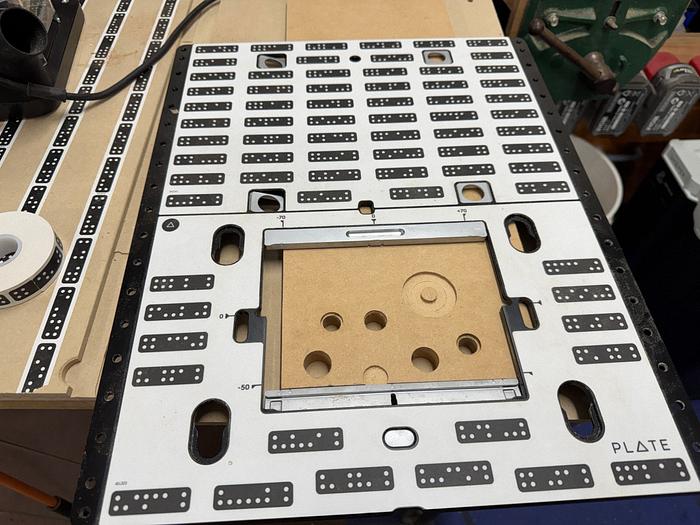
Plate is a universal template designed to install a wide range of hardware, inlay bow ties, round corners, route system 32 holes and much more. Mark your stock and cut exactly where you want to, no measuring, no layout, no guesswork.
The Plate already has the dominos printed/embossed on it so care needs to be taken not to scratch the surface with low hanging router bits or any other sharp objects.
Once scanned, it can be reused/copied for different projects without the need to rescan again.
During scanning, I had to cover the domino pattern on my tabletop as when they were detected, the Origin reported a pattern discrepancy on different levels… clever little bugga.
Apparently each Plate sold has a different domino configuration to maintain uniqueness.
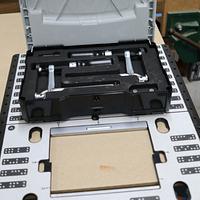
The Plate has two major anchor features to align it to edges of boards to be processed,
what are called edge flags(1), can be pushed/angled down (upside down presentation),
and a fence (2) that can be extended,
to align the bottom edge and then retracted,
With only a maximum work window of 160mm x 120mm, once gridded, it can be moved around the work area and aligned with alignment marks, which when properly done, large areas can be processed/appended (my guess, not proven).
Draw up a set of intersecting (“+”) alignment lines/marks wherever you want a design centered,
To centre inside the job, extend the Reticle,
and align it at the intersection using the markings,
then retract the Reticle,
and use touch points 1 and 2 to establish the X axis and 3 for the Y. This places the 0,0 anchor point in the middle.
You can extended the bottom fence and align its centre point on the line at the base of the job
and use the same 3 points described above to grid on that centre line… just don’t forget to retract that fence.
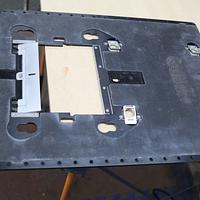
The Plate has an Anti-Slip mat on the underside to… surprise, surprise,
stop the Plate from slipping.
The Plate comes with a pair of profiled clamps,
that can be used to clamp the Plate to the workpiece,
using finger tight pressure not to distort/buckle the Plate, without interfering with the operation/path of the Origin.
The Plate has sets of M5 threaded holes to stabilise it using bolts,
if it may become unstable with overhangs. Because of the protruding length, I was skeptical it would impede the Origin’s movement,
Don’t know whether it’s by good design or just sheer luck, but it seems that when butted up against that bolt, the bit is stopped just inside the window,
With this configuration,
…. anyone want/need a beautiful set of Woopeckers Corner Jig
… going cheap?
As I was about to post this review, I posed this comment on my Shaper Origin review,
· My Woodpeckers Corner Jig, about 20 holesaws, all my forstner bits can also be replaced with the aid of the Shaper Plate which is next on my review list.
Bold statement to make by an inexperienced, who hadn’t tried it… well I can’t say that ever again.
Loaded up a scrap piece of 16mm MDF and set the depth of cut to 17mm,
Selected a 63mm dia. circle as I know I haven’t that sized holesaw and selected the Autopass option… which is a purchasable add on that will cut the depth in multiple passes based on the diameter of the router bit and the plunge depth… rule of thumb is that a plunge cut should not exceed the dia. of the bit.
Placed it in the middle of the Plate receptacle,
the inside cut (1) was chosen with zero offset (2), generating the following 4 passes,
Note that an offset was automatically chosen for the first 3 cuts with a zero offset for the finishing cut that takes out any kinks.
The inside cut inferred that this will be a hole cut, however, if you wanted a circle of 63mm, changing to the outside cut will change the router positioning to the outside of the circle,
You may have noticed the dotted path line position has changed.
As I routed, the Origin kept track of the starting point and after each pass crosses that point, the bit is automatically lowered… sorry didn’t take a picture)… I did stop when it signalled “approaching the finishing (final) pass”,
This was my very first try and I should have lubed/buffed the router base and plate as I found it hard to push and crossed the limitting guides, raising the bit several times on the first pass. I then noticed the cord was snagging, causing this jerk, to jerk the Origin.
With a few learning oopsies for my pilot run, I was gruntled with the result,
Unfortunately, with the changed outside setting, inferring a circle cut, it was the circle that displayed some of the oopsies damage,
… not only that, I should have used double sided tape as the circle was loose inside the hole for the finishing pass.This same process can be repeated for “Forstner” holes and you can even use an engraving (V) bit to put a centre spur at the bottom of a non through hole.
Naturally these options could be a tad difficult for wall holes, however, certainly bypasses the need to struggle on the drill press table for larger workpieces, or trying with a drill.
All that now exhausts my knowledge of this accessory. Thanks for looking if you got this far… and if you didn’t, you’ll miss my thanks... but you won’t know unless you read this para, to reread the whole article.
Don’t be crafty Craftisians,... SHARE your craft!
If your first cut is too short... Take the second cut from the longer end... LBD
As you mentioned, ducky, if you’re cutting out a part always make sure double sided tape crosses both the main body and piece to be cut away so they both stay securely in place after the last cut. You will/may find that doing this results in some gum stuck on the bit as it cuts through the double sided tape. Easily enough cleaned off with some mineral spirits, but you can also engineer connecting tabs into your design to be cut away manually later…but that does create more interrupted steps. Invest heavily in double sided tape!
Ryan/// ~sigh~ I blew up another bowl. Moke told me "I made the inside bigger than the outside".




.png)


.png)

.png)


%20+%20Pink%20Boots.png)